I Built a Documentation Tool Because a Copyright Claim Had No Paper Trail
TrackDataPad didn’t start as an edge micro-SaaS idea. It started with a blown sugar video.
I was editing footage of a chef shaping molten isomalt: delicate glass-like structures bending under heat. I found a track on Pixabay labeled “no copyright,” uploaded the video, and it got flagged on YouTube.
If the track was covered by the Pixabay license, what exactly was going on? A quick search confirmed I should dispute the claim. But when I went back to the track page to download it again, I hit another wall: no certificate available.
That sent me down a rabbit hole. Pixabay distinguishes between Content ID and non-Content ID tracks. Content ID tracks get a shield icon and a downloadable certificate you can submit with YouTube disputes. Non-Content ID tracks have neither. Claims can still come in on them; through third-party registrations or automated detection. But when they do, disputes are handled manually using the standard Pixabay license instead of a pre-generated certificate.
So what was I supposed to paste into the dispute field?
When you open the YouTube Studio dispute form, it asks for structured details: track title, artist, source URL, license type, confirmation of where the music was downloaded. All of this exists on the Pixabay track page. The problem is that non-Content ID tracks don’t come with a downloadable license certificate, so you end up reconstructing those details later and translating them into a coherent dispute statement.
The license was valid. I just had to assemble the proof; and I realized every creator in the same situation was doing the same manual reconstruction, alone, with no tooling.
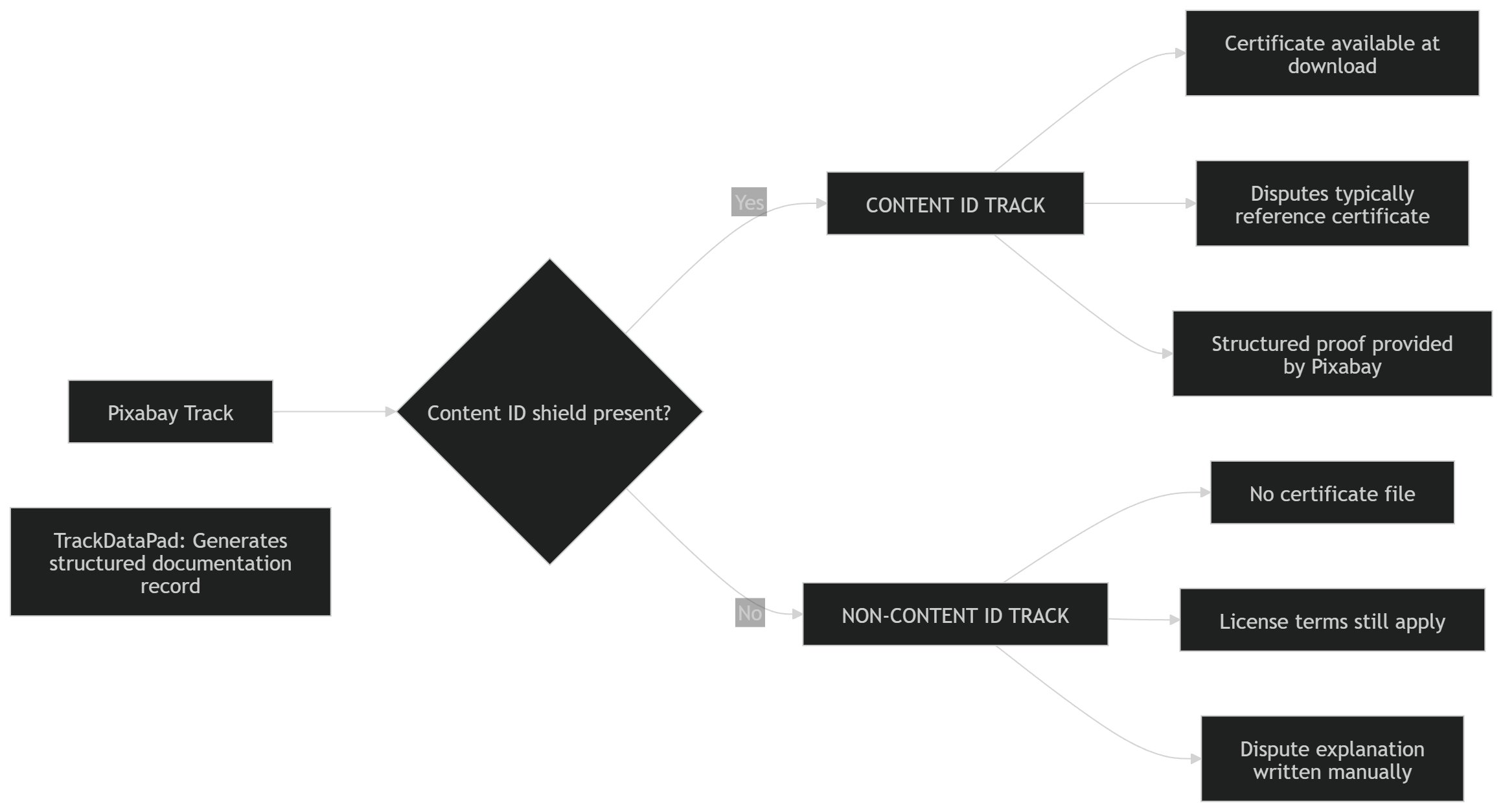
Each platform works correctly on its own. The gap appears where the systems meet.
So I built TrackDataPad to turn a frustrating process into a simple one.
The Actual Problem
The workflow between “I have a valid Pixabay license” and “I can submit a coherent YouTube dispute” was entirely manual and unstructured.
You paste a Pixabay track URL. TrackDataPad extracts the canonical metadata: title, artist, username, file ID, URL. It detects Content ID participation status and generates a plain-text documentation record formatted for dispute workflows. For non-Content ID tracks only. That’s the whole product. Deterministic input-to-output.
Architecture (The Short Version)
The stack is deliberately minimal:
- Cloudflare Pages for the static frontend
- Cloudflare Workers as a stateless API layer
- Cloudflare KV for license state and usage counters
- Stripe for billing via webhook
The Worker handles everything: license validation, daily cap enforcement, metadata structuring, abuse mitigation, and Stripe webhook processing. Single file, covered by a Vitest suite.
User
  │
  ▼
Cloudflare Pages (Static Frontend)
  │  (fetch)
  ▼
Cloudflare Worker API
  │
  ├── Cloudflare KV  (usage counters, license state)
  └── Stripe Webhook (subscription activation)
Edge-native by design. The system generates documentation adjacent to copyright workflows; long-lived tokens, session state, and unnecessary data collection are all risks not worth taking. KV instead of a database because this is a micro-SaaS: license records and usage counters don’t need relational queries.
Abuse Prevention Is Infrastructure, Not Policy
Expose a metadata generation API publicly, and people will try to scrape it. That’s not a security failure; it’s just the internet.
The free tier uses three-layer tracking:
- Composite identifier (IP + browser fingerprint + device ID)
- Browser fingerprint only (persists through cookie clearing via IndexedDB)
- IP-based cap (covers shared networks, with a higher threshold)
Daily TTL-bound counters in KV. Any layer hits its limit, the request is denied.
The app is free, with 3 records per day. A pro version with batch mode is coming for regular uploaders, multi-video managers, or anyone who wants to back the project.
The Chrome Extension and the Bookmarklet Fallback
The Chrome extension was supposed to launch alongside the web app: autofilling track metadata directly from a Pixabay page, pulling title, artist, licensee, and file ID from the live DOM without any copy-paste. Chrome Web Store review is still pending.
Rather than wait, I built a bookmarklet. No install required, works the same way. The extension and bookmarklet share the same scraping logic and produce identical output. When the extension clears review, the bookmarklet stays as a permanent fallback.
The Systems Lesson
This project exists because three systems do not communicate well: Pixabay, YouTube Content ID detection, and the YouTube Studio dispute workflow.
TrackDataPad does not solve copyright or override Content ID. It simply adds structure where these systems do not connect.
The blown sugar video eventually cleared. No strike, no penalty.
But the real outcome was understanding the system well enough to reduce uncertainty the next time; and building something that makes that process easier for other creators too.
TrackDataPad is live at trackdatapad.com